Support
How to delete your account
Step-by-step guide to permanently deleting your ACLogics account and understanding our data retention policies.
If you wish to close your ACLogics account and permanently remove your personal data, you can do so directly within the app. This guide walks you through the deletion process, explains what data is deleted, and outlines what is retained.
Step-by-Step Deletion Guide
To delete your account from the ACLogics app:
- Tap your Account Badge in the top navigation bar of the app to open your profile.
- Select Edit Profile to view your account details.
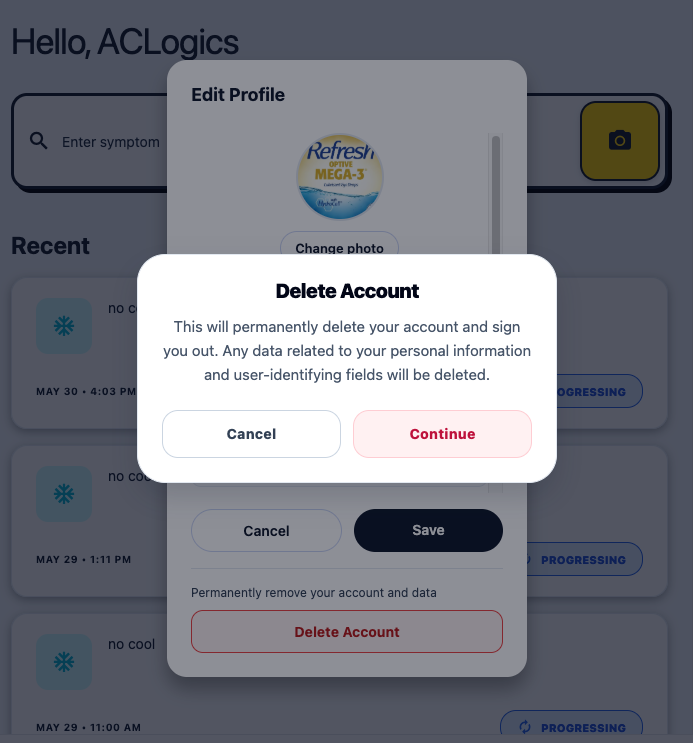
- Scroll to the bottom of the Edit Profile screen and tap the red Delete Account button.
- A confirmation dialog will appear, warning you that the action is permanent. Tap Continue to confirm and complete the deletion.
Data Deletion & Retention Policy
When you confirm your account deletion, your data is handled according to the following policies:
1. What is Deleted Immediately?
- Personal Profile Data: Your name, email address, credentials, profile photo, and user-identifying fields are permanently deleted from our servers immediately.
- Preferences & Subscriptions: Any individual settings, search histories, and individual preferences are purged.
2. ScanPro Images (90-Day Policy)
- 90-Day Auto-Deletion: Equipment nameplate and system component images captured via ScanPro are temporarily stored on our servers to assist with OCR text extraction. By default, these images are automatically and permanently deleted 90 days after upload.
- Manual Deletion in Advance: You can manually delete any of your ScanPro images at any time directly through the app before the 90-day automatic deletion window.
3. What Cannot Be Deleted?
- System-Generated Diagnoses & Reports: Troubleshooting diagnostics, AI-generated questions/answers, and technician reports generated by the system cannot be deleted by the user. This is to maintain historical consistency and audit logs for field service operations. If you are part of an organization, this data remains the property of the organization.
Requesting Specific Deletion
If you need to request the deletion of specific diagnostic records, reports, or other contents not covered by the standard account deletion process, please email our support team at team@aclogics.com with the relevant details.
Note: If the account deletion process displays a warning or error, some background cleanups may have timed out. In this event, please email support to confirm complete removal.
Need support?
Email ACLogics with the issue details.
Include the account email, device model, app version if known, screenshots, and the exact message shown.